Non-profits or NGOs in Uganda operate in demanding environments. The need, therefore, for catalyzing software like Microsoft 365 cannot be emphasized enough.
Daily realities include limited internet reliability, dispersed teams, inconsistent digital literacy, and strict donor reporting requirements. Most organisations juggle these challenges while striving to increase their impact with restricted resources.
Furthermore, the pressure to demonstrate measurable outcomes has intensified. Donors expect transparency. Boards require data. Field teams need coordination. And nearly all this depends on digital infrastructure that often lags behind mission needs.
This article explains how Microsoft 365 for Non-Profits Uganda helps organisations meet those demands. It examines the platform’s core features, from communication tools to security frameworks, and demonstrates how these align directly with the operational demands faced by Ugandan NGOs.
We at Othware have worked with non-profits across Kampala, Gulu, Fort Portal, and Mbale since 2015. Our team provides technology implementation, digital training, cloud migration, and technical support. We combine local experience with enterprise-grade expertise.
Besides understanding the tools, it’s essential to understand the context. This guide speaks from the ground up, drawing from field experience and proven systems that work within Uganda’s infrastructure and policy environment.
The right platform, implemented well, can amplify your operational capacity. That’s what we’re here to unpack.
Why Microsoft 365 Matters for Non‑Profits in Uganda

Microsoft 365 for Non-Profits Uganda provides qualified organisations with cloud-based productivity and collaboration tools, made accessible through Microsoft’s global philanthropic licensing programme.
Through TechSoup’s local validation partner, eligible non-governmental organisations in Uganda can apply for free or heavily discounted licenses.
The most commonly issued plans include:
- Microsoft 365 Business Basic (free for up to 300 users)
Includes Teams, Exchange Online, OneDrive, SharePoint, and web-only versions of Office apps. - Microsoft 365 Business Standard (discounted pricing)
Adds desktop Office apps and Power Automate for workflow automation. - Office 365 E1/E3 Nonprofit (enterprise-grade, web-based or desktop)
Designed for larger NGOs managing regional or multi-country operations.
The registration process requires submission of a valid NGO certificate, a clear mission description, and recent financial documentation. Most local organisations receive approval within 10 to 14 business days after submitting their application.
Why does this matter in Uganda’s NGO context?
Operational realities on the ground often include:
- Field teams operating from Kitgum, Kasese, or Kiryandongo with inconsistent network access
- Annual grant cycles require frequent program audits and donor reporting
- High staff turnover, leading to loss of institutional knowledge
- A mix of mobile and desktop users, many with limited technical training
- Dependence on shared laptops, insecure drives, or email-only workflows
Microsoft 365 is designed to mitigate these exact conditions in Non-profits.
Real-time Collaboration
Microsoft Teams replaces siloed communication channels. Field officers can join virtual check-ins using mobile data. Documents edited in Kampala are updated instantly in Luwero or Hoima via SharePoint.
Secure Storage and Backup
OneDrive offers each user 1TB of cloud storage. Files are protected from accidental deletion with version history and retention policies that administrators can configure. This is particularly critical when laptops are shared or frequently lost due to theft, power outages, or other damage.
User Management
Azure Active Directory enables granular control over access. When staff leave, administrators can instantly revoke credentials without affecting shared files or systems.
Offline Capability
Office desktop applications sync files locally. Staff can work offline and auto-sync once reconnected, which is essential in areas like Nakapiripirit or Yumbe.
Licensing at Zero Cost
For most NGOs, Microsoft 365 Business Basic provides all essential functionality without requiring software spend. Organisations only need to invest in reliable internet and basic support capacity.
Donor Confidence
Microsoft’s compliance with ISO 27001, GDPR, and SOC 2 Type II enhances data integrity. NGOs can demonstrate strong governance frameworks and audit trails during proposal reviews or donor due diligence.
Microsoft 365 is a sustainable framework that reduces manual overhead, improves data access, and supports continuity during staff changes or regional disruptions for Non-profits. For a non-profit under operational pressure, that reliability is no small thing.
Core Capabilities that Empower NGOs
Microsoft 365 for Non-Profits Uganda is a unified platform providing communication, file management, identity security, automation, analytics, and continuity.
It serves as the operational backbone for non-profit organisations operating across diverse Ugandan districts. Each module contributes to a structured environment that protects data, enhances productivity, and strengthens accountability to donors and boards.
This foundation also simplifies training, onboarding, and scaling new initiatives.
1. Communication and Collaboration
Microsoft Teams centralises organisational messaging, video meetings, file exchange, and shared calendars. Staff working in Jinja can coordinate seamlessly with partners in Lira or Soroti using Teams mobile apps, even with low bandwidth.
Meetings scheduled in Outlook sync automatically with Teams calendars. Departmental channels maintain structured project communication, and chat threads are archived for accountability and transparency.
SharePoint complements Teams by providing a controlled environment for long-term document storage. Teams often house short-term exchanges. SharePoint holds records, templates, and operational materials with version control and access permissions.
2. Document Management and File Governance
Each staff member receives 1TB of storage in OneDrive for Business. This storage is encrypted and accessible from desktop or mobile devices. Local copies sync automatically to the cloud once the internet becomes available.
SharePoint document libraries enable centralised file access across teams. Permission layers can be role-based, department-based, or custom-defined. Othware typically configures NGO libraries with restricted access folders for finance, programs, and HR.
Automatic file versioning enables rollbacks in case changes introduce errors. We often configure 180-day recycle bins and retention policies to satisfy audit and donor retention requirements.
3. Security and Access Management
Microsoft 365 supports advanced identity control via Azure Active Directory. Multi-factor authentication (MFA) is included, enabling secure logins even from shared devices.
Administrators can define Conditional Access policies based on IP location, device compliance, or user group. This ensures that staff logging in from non-approved regions are either prompted to reauthenticate or denied access entirely.
Microsoft Defender for Office 365 scans all incoming mail for malware, spoofing, or phishing attempts. Alerts are reported through the Microsoft 365 Security Centre. In some NGO deployments, Othware configures automatic escalation of these alerts to our managed service response team.
4. Workflow Automation and Operational Efficiency
Power Automate enables NGOs to convert manual tasks into structured digital processes. No programming is required.
Examples include:
- Automatically copying field reports from email into SharePoint libraries
- Routing purchase requests for approval based on value thresholds
- Creating notifications when key project folders are updated
Training non-technical staff to build and manage flows typically takes less than two hours. Once built, these flows operate continuously without further intervention.
Microsoft Forms allows data collection from staff, volunteers, or beneficiaries. Data entries push directly into Excel Online or SharePoint for immediate analysis.
5. Insights and Data Visualisation
Power BI connects to internal systems, including Excel spreadsheets, SharePoint lists, SQL databases, and external sources. NGOs use it to generate dashboards on program reach, fund allocation, or monitoring and evaluation outcomes.
Visuals are interactive and live—no need to rebuild charts for every donor review. Dashboards can be published securely via links or embedded in Teams channels.
We’ve implemented these dashboards in the agriculture, education, and WASH sectors, particularly for organisations that require cross-district performance tracking.
6. Continuity and Disaster Recovery
Microsoft 365’s built-in cloud architecture offers automatic replication of user data across multiple Microsoft datacentres. This ensures continuity if devices are lost, stolen, or corrupted.
Staff can change laptops or log in from different locations without losing access to their data. Admins can remotely wipe lost devices, reset credentials, or reassign licenses in under five minutes.
These controls prevent disruption during emergencies or hardware failure. For NGOs working in insecure or high-mobility areas, this resilience is operationally critical.
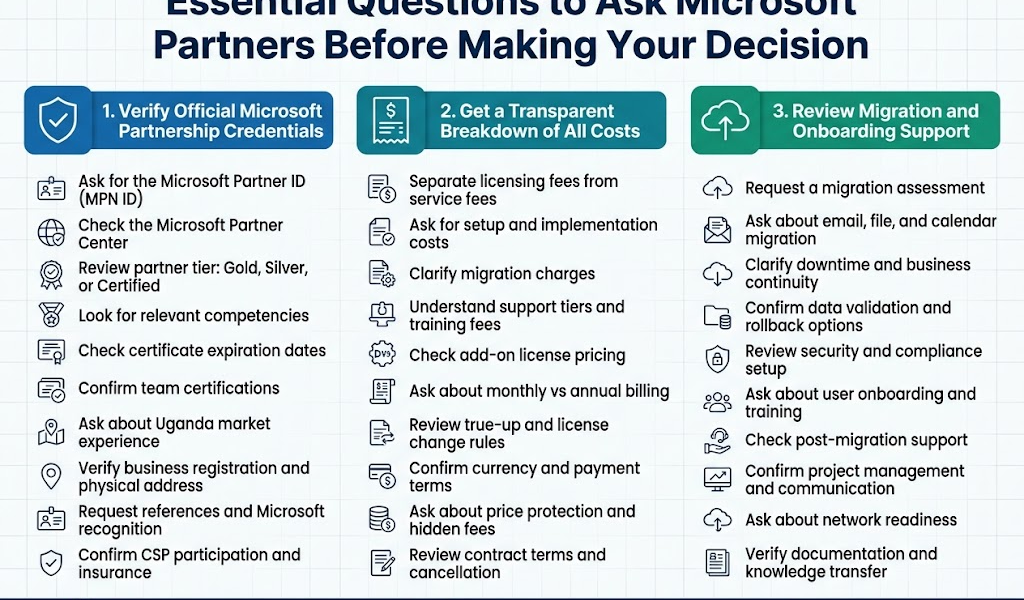
How Othware Supports Ugandan NGOs in Implementing Microsoft 365
Othware provides end-to-end technical execution for NGOs transitioning to Microsoft 365 in Uganda. We work directly with administrators, IT officers, and executive directors to plan, deploy, and maintain the platform.
Each engagement begins with an assessment. We review device count, connectivity conditions, user roles, security practices, and existing tools. This information allows us to recommend an appropriate Microsoft 365 configuration and licensing plan.
Othware assists with the TechSoup eligibility process. This includes account creation, documentation upload, and licensing requests. Most NGOs complete registration in 10 to 14 days if their documents are in order.
After Approval
Once approval is confirmed, we move to technical onboarding. This typically includes domain verification, Microsoft Exchange configuration, SharePoint site setup, Teams deployment, and OneDrive rollout.
Our engineers perform email migrations from Gmail, Zimbra, or legacy Exchange. We conduct mailbox audits and clean-up before moving data to Microsoft 365 servers. No third-party tools are needed for most mailboxes under 25 gigabytes.
After system configuration, we schedule staff training. These sessions are adapted to your team’s technical level. Topics include file access, account security, Teams use, document collaboration, and workflow creation. Training can be delivered on-site or online.
Security hardening follows. We enable multi-factor authentication, configure device access policies, and apply baseline protection rules through Microsoft Secure Score. Backup protocols and retention policies are activated based on your donor and policy requirements.
Our support does not end with setup. We offer maintenance agreements for ongoing user support, system updates, policy changes, license adjustments, and security monitoring. For NGOs operating in remote regions, we provide remote access tools and offline sync configuration.
We also handle annual reviews. These sessions verify license alignment, user deactivation, group permissions, storage limits, and backup verification. If needed, we coordinate with Microsoft on licensing renewals or plan upgrades.
Othware builds Microsoft 365 environments that can survive connectivity outages, staff turnover, security breaches, and funding interruptions.
Challenges, Risks, and Best Practices
Effective adoption of Microsoft 365 in Ugandan NGOs involves transparent governance, reliable connectivity planning, staff engagement, and disciplined administration.
Each area below defines a precise operational element and a recommended practice for implementation.
Challenge: Poor internet quality in rural field offices
Many districts, including parts of Bukedea, Kalangala, and Nwoya, still rely on 3G or intermittent mobile broadband. Sync failures or long file load times disrupt collaboration.
Best Practice
Enable offline access in OneDrive and SharePoint—train staff to work in the local Office apps and allow files to sync later. Limit video calls where mobile data is unreliable.
Challenge: Resistance to process change among staff
Some team members continue using personal emails, local folders, or WhatsApp for work communication. This creates data silos and bypasses audit controls.
Best Practice
Roll out tools gradually. Start with core features like Outlook and OneDrive. Pair early adopters with slower users to guide daily habits. Conduct refresher training every quarter.
Challenge: Inconsistent user account management
Former staff sometimes retain access for weeks. Shared accounts are common. New hires receive an incomplete setup or wrong permissions.
Best Practice
Use a documented onboarding and offboarding checklist. Assign role-based groups for Teams, SharePoint, and mail distribution. Review active users monthly using the Microsoft Admin Centre.
Challenge: Security configuration left incomplete
Some NGOs delay MFA, device policies, or mailbox auditing due to time pressure. This exposes sensitive records and staff credentials.
Best Practice
Apply Microsoft Secure Score recommendations within the first 14 days after deployment. Enforce MFA on all admin and staff accounts. Review conditional access rules biannually.
Challenge: Weak file naming and folder structures
Shared document libraries become cluttered or unreadable. Staff cannot locate the correct version or distinguish approved files from drafts.
Best Practice
Standardise folder templates per department. Define clear naming conventions for files, particularly for reports, budgets, and meeting minutes, and train staff to use metadata filters in SharePoint.
Challenge: Lack of internal governance or usage policy
Without clear rules, users are unsure how long to retain documents, where to store confidential data, or who owns specific folders.
Best Practice
Develop a written Microsoft 365 use policy. Include guidelines for document storage, file sharing, role access, password strength, and mobile device usage. Review policies every 12 months.
How to Get Started with Othware
Begin with a technical readiness review. Othware conducts this at no cost. The review includes current infrastructure, staff count, licensing needs, and connectivity constraints.
Once reviewed, we prepare a step-by-step implementation plan. This covers licensing application, mailbox migration, SharePoint setup, Teams configuration, and security controls.
After internal signoff, we submit your application through TechSoup Uganda. Approval typically takes ten business days. Once verified, licenses are activated and services provisioned.
We then complete the configuration in phases. This includes staff accounts, domain linking, email routing, file migration, and permission structures. Training follows immediately.
Support continues after deployment. We provide account monitoring, license tracking, compliance checks, and user assistance.
To request a readiness review, please contact the Othware technical team through our online support form, email, or by direct call to our Kampala office.
Othware builds Microsoft 365 environments that meet real operating requirements for Uganda-based NGOs. Start with a technical plan. Let the tools follow.
Conclusion
Microsoft 365 for Non-Profits Uganda provides a structured platform for communication, file governance, user identity management, and operational reliability. These systems are not additions to the mission. They are the infrastructure that sustains it.
Othware delivers full-cycle Microsoft 365 implementation for NGOs operating across Uganda. We provide assessment, deployment, staff training, security configuration, and ongoing administrative support. Our technical processes are grounded in local field realities and mapped to donor requirements.
Begin with a readiness review. Proceed with a defined deployment sequence. Maintain with scheduled oversight. This model ensures continuity across projects, funding cycles, and staff transitions.
To initiate your implementation, please contact our technical support team using the information provided below.
Othware Limited
Plot 29 Hancook Road
Ntinda, Kampala, Uganda
Contact Information
Phone: +256 702 843 825
Alternate Line: +256 414 670 258
Website: www.othware.co.ug

Passionate about tech, a better writer than talker. Also a Content writer @ Othware.