What is Dynamics 365 Business Central, and how is it transforming business operations in Uganda?
Across Uganda, businesses that once managed operations with spreadsheets or fragmented tools now face a different set of realities.
Their customer bases have expanded, inventory volumes have grown, and accounting, logistics, procurement, and compliance needs have multiplied. As each function adds complexity, scattered systems slow down execution and compromise visibility.
Meanwhile, a steady wave of technology adoption is moving across industries.
Ugandan SMEs and mid-sized firms are migrating core processes to cloud platforms.
Financial managers request real-time dashboards. Auditors demand electronic trails. URA enforces e-invoicing. Even field operations, once manual, are now tracked using mobile apps and centralised dashboards.
The shift is well underway.
Enterprise Resource Planning (ERP) systems have emerged as the architecture behind this shift.
They unify business functions, such as finance, procurement, sales, and inventory, into one platform.
Furthermore, they reduce double-entry and improve audit readiness, enabling cross-departmental collaboration in a measurable and secure environment.
For many Ugandan companies, ERP is not a future investment but rather a current operational requirement.
What Is Dynamics 365 Business Central?
Dynamics 365 Business Central is a cloud-first Enterprise Resource Planning (ERP) system developed by Microsoft.
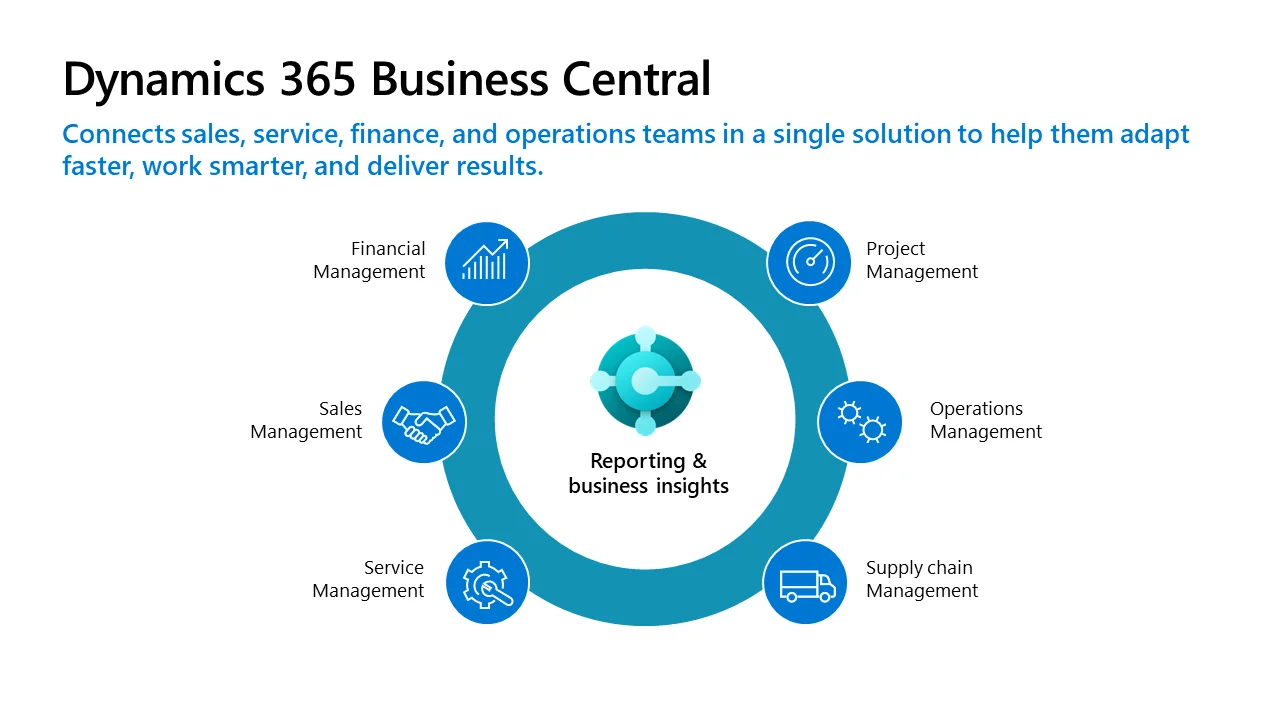
It enables businesses to manage accounting, procurement, sales, inventory, and project operations from a single interface. Its primary function is to unify processes across departments, eliminate redundancy, and provide real-time visibility into performance metrics.
Whether accessed via browser, desktop, or mobile app, it serves as the operational backbone for organisations seeking scalable and intelligent systems.
Initially developed as Dynamics NAV (or Navision), the platform transitioned to Business Central with Microsoft’s shift to a cloud architecture in 2018.
NAV had already built a reputation for flexibility and customisation in mid-market ERP deployments.
Microsoft retained this core functionality while modernising the experience, upgrading its interface, and positioning it within the broader Dynamics 365 suite.
Today, Business Central forms part of Microsoft’s long-term strategy to deliver integrated, update-ready, and AI-compatible business applications.
The system itself is modular and highly configurable. It includes dedicated applications for general ledger, accounts payable, receivables, budgeting, procurement, warehouse management, sales, payroll (in some deployments), and service management.
Built-in workflows allow automation of approvals, order routing, and alerts. Users interact with a role-based dashboard designed for finance managers, operations staff, inventory handlers, and executive users alike.
Business Central is fully embedded within Microsoft’s enterprise ecosystem. It connects natively with Microsoft 365 (Excel, Outlook, Teams), Azure Active Directory, Power BI, and the Power Platform.
Through these integrations, users can automate reports, generate dashboards, trigger approval workflows, and securely manage business data across cloud environments.
The experience feels familiar to users already working in Microsoft environments, and the system benefits from Microsoft’s global update cycle, typically refreshed every six months.
Functional Capabilities of Business Central
Dynamics 365 Business Central is designed to manage core business operations through a suite of interconnected modules.
These capabilities address key areas, including finance, procurement, inventory, sales, and reporting.
Each function is accessible through a role-based dashboard and can be configured to meet specific operational requirements.
1. Financial Management
The financial module provides a general ledger, fixed asset register, bank reconciliation, and multi-currency support. It tracks accounts payable, receivables, VAT, and budgeting. Users can define their own chart of accounts and enforce approval workflows for payments. Additionally, it provides real-time visibility into cash flow and generates regulatory reports for tax compliance purposes. Audit trails are automatically recorded.
2. Inventory and Supply Chain
Business Central features detailed inventory controls, including batch tracking, serial number registration, reorder policies, and stock valuation methods. The system supports location-based warehousing, bin management, and pick/pack workflows. Besides that, users can configure lead times, safety stock, and supplier price lists. Purchase orders, goods receipts, and invoicing are all managed through the same interface.
3. Sales and Customer Relationship
Users can manage customer accounts, issue quotes, generate sales orders, and monitor receivables in a single module. Price and discount structures are configurable by item, volume, or customer group. Additionally, the system tracks sales history and pipeline activity. Email templates and CRM extensions support customer follow-up.
4. Procurement and Vendor Management
Procurement workflows are fully embedded into the system. From supplier evaluation to purchase requisitions, approvals, order placement, and invoicing, each step is monitored. The system can auto-suggest reorders based on consumption trends. Vendor performance analytics and cost history reports support sourcing decisions.
5. Project and Resource Management
Users can track billable hours, job tasks, budgets, and resource allocations within projects. Gantt views and WIP (Work in Progress) calculations enable more accurate forecasting. Project costs, time entries, and progress billing are integrated with the finance module. Resource capacity planning tools are available.
6. Reporting and Business Intelligence
Built-in reports cover trial balances, aged receivables, stock movement, and VAT summaries. Moreover, users can build custom reports using Power BI and embed them within dashboards. Dimensions allow multi-level data slicing. Scheduled reports and Excel exports are available without additional licenses.
Why ERP Is Crucial for Business Growth in Uganda
As Ugandan enterprises expand, their operating environments become increasingly complex.
A wholesaler that once managed 200 kilograms of sugar is now moving 3,000. A consulting firm that previously tracked projects in a spreadsheet now manages 12 client contracts across multiple cost centers.
As this complexity increases, so does the pressure on internal systems to keep up.
Accounting entries multiply, stock misalignments occur, and decision-makers lose visibility into real-time business activity. Without a single system to consolidate information, key functions drift into silos.
At the same time, digitisation is no longer optional.
Uganda Revenue Authority enforces electronic invoicing through its EFRIS system. Financial institutions require audited financial statements and system-generated reports before approving credit.
Staff work from mobile devices in remote locations, especially in distribution and field service. Additionally, many firms now operate digital procurement systems or utilize third-party tools.
These environments generate multiple data streams that require coordinated handling. ERP platforms provide the infrastructure to unify these streams while ensuring regulatory alignment.
Fragmented systems introduce significant risk. Manual entries open the door to duplication, fraud, and untracked liabilities. Cross-functional tasks such as converting a sales quote into an invoice or syncing inventory after dispatch often fail when managed across disconnected tools.
Moreover, maintaining audit compliance, internal controls, and board-level reporting becomes increasingly tricky. When data lives in five different places, reporting becomes speculative.
Let’s be clear: without ERP, the cost of administrative uncertainty rises sharply as the business scales.
ERP systems, such as Dynamics 365 Business Central, mitigate these risks while enabling growth.
Industry Use Cases in the Ugandan Context
As businesses grow, their needs become highly sector-specific. An ERP system only proves effective when it adapts to the daily operations, compliance demands, and data structures of each industry.
Dynamics 365 Business Central supports this flexibility by offering modular functionality that can be configured to match distinct sector workflows. In Uganda, ERP adoption is beginning to take shape across various industries, each with its own unique operational logic and varying levels of technology maturity.
Retail and Wholesale Distribution
Fast-moving goods firms in Uganda often manage hundreds of transactions daily.
Between inventory movement, invoicing, and credit sales, the risk of mismatched data is high.
Dynamics 365 Business Central helps traders, importers, and distributors track item availability across multiple branches, apply pricing by customer segment, and manage receivables in one system.
Additionally, users can reconcile warehouse stock with system records at the end of the day without needing to perform manual counting.
Manufacturing
Local manufacturers often rely on spreadsheets to manage raw materials, production output, and cost control.
This leaves room for error in tracking wastage, batch costing, and stock valuation. With Business Central, production managers can define bills of materials (BOMs), monitor input-output ratios, and automate reordering of critical materials based on consumption data.
The system also supports overhead absorption and work-in-progress tracking.
Agribusiness and Cooperatives
Agribusiness firms, particularly those managing farmer networks or seasonal supply chains, require robust visibility into inventory, payments, and logistics.
Business Central enables cooperatives to manage member contributions, track input distribution, and reconcile payments at scale.
Additionally, it supports multi-location stock control, allowing regional warehouses or field stores to operate on synchronized inventory records.
Professional Services
Consultancies and audit firms in Kampala, Jinja, or Gulu increasingly require accurate project billing and resource allocation.
Business Central’s job management module allows tracking of billable hours, milestone-based invoicing, and cost recovery across contracts.
Each project maintains its own profitability records, providing partners with visibility into margins before closure. Additionally, timesheets sync directly with payroll and invoicing cycles.
NGOs and Donor-Funded Programs
For nonprofits, grant compliance and donor reporting can significantly impact future funding opportunities.
Business Central provides fund accounting structures, donor tagging, and automated financial reporting tools that align with grant conditions. Project managers can control spending limits, allocate overheads, and provide real-time updates on expenditure.
Deployment and Integration Options
Business Central is available as a fully cloud-hosted ERP solution on Microsoft Azure, but it also supports on-premise and hybrid deployments through local hosting infrastructure.
The Software-as-a-Service (SaaS) model delivers monthly updates directly from Microsoft, allowing customers to access the system via a browser or mobile app.
For organisations with intermittent internet access or strict data controls, the on-premise version allows local hosting with manual update scheduling. In Uganda, many firms opt for hybrid setups to strike a balance between performance and control.
Licensing is based on named-user subscriptions, typically grouped into Essentials or Premium tiers, depending on the required functionality.
There’s no need to purchase hardware for cloud setups, though on-premise installations require server infrastructure, database configuration, and backup protocols. In addition, cloud-hosted deployments benefit from Microsoft’s built-in security features, data redundancy, and recovery services.
However, bandwidth reliability and data governance policies must still be considered when selecting a deployment model.
Business Central integrates natively with the Microsoft 365 environment, including Excel, Teams, Outlook, and OneDrive. Power BI dashboards can be embedded into the user interface, while Power Automate enables the creation of custom workflows across various systems.
On top of that, REST APIs support integration with third-party systems such as payment gateways, POS terminals, or e-commerce platforms.
Businesses with specialised tools—like asset tracking apps or donor CRM systems—can connect them through middleware or direct endpoints, ensuring data flows remain synchronised.
Challenges and Implementation Insights
Rolling out an ERP system, such as Dynamics 365 Business Central, demands technical precision, disciplined planning, and continuous alignment between system logic and daily business practices.
The following key challenges often define whether an implementation succeeds or struggles.
User Resistance and Operational Behaviour
ERP adoption requires people to unlearn workarounds. In Uganda, many companies rely on informal knowledge. Introducing system-enforced workflows interrupts these habits.
Besides, user roles come with access limitations, which some staff may perceive as a loss of control. Without targeted training and internal buy-in, even a well-designed ERP rollout will stall at the human layer.
Data Quality and Migration Effort
Old systems rarely hold clean, standardised data. One supplier might appear under three slightly different names.
Stock entries may lack units of measure. In Business Central, imported data must match the required field formats, reference keys, and workflow logic.
This requires a thorough cleaning process before going live. Moreover, failed imports or mapping errors can delay configuration and undermine early trust in the system.
Workflow Configuration Complexity
Every organisation handles approvals, billing, and inventory differently. Business Central accommodates this, but only if those workflows are properly designed during setup.
For example, how does a purchase request move from operations to finance? Who must approve above a certain threshold? These rules must be defined, tested, and aligned with real business practices. Configuration without consultation often leads to rework after go-live.
Infrastructure Dependencies
Even in a cloud-first model, Business Central depends on stable devices and reliable connectivity.
Slow computers create bottlenecks in transaction posting. Unstable power in branch offices can interrupt operations.
Besides, users in remote regions may need offline contingency workflows. Some firms deploy local database replicas or hybrid setups to reduce risk, but this adds complexity during deployment and ongoing maintenance.
Budget Scope and Post-Launch Support
Licenses represent only part of the cost. Implementation support, user onboarding, data migration, and future system adjustments all require time and technical expertise.
Most businesses underestimate the internal resource demands, namely, the hours spent on testing, troubleshooting, and retraining. ERP systems evolve as the company grows, and without ongoing configuration reviews, their usefulness plateaus within a year.
Choosing the Right ERP Partner
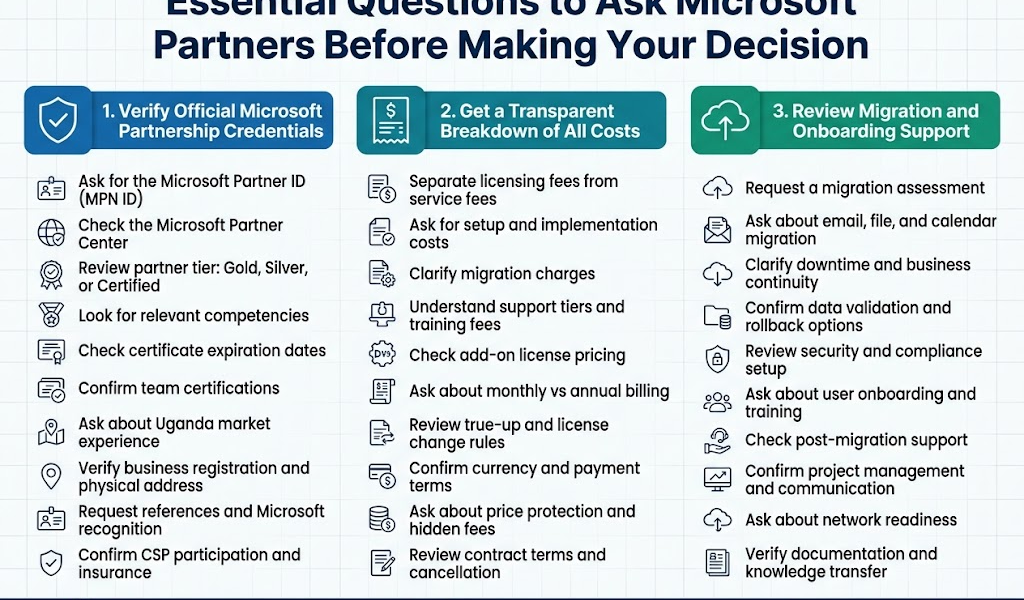
Adopting a platform like Dynamics 365 Business Central without implementation support is rarely sustainable.
ERP systems impact how people work, how data is processed, and how decisions are made.
The partner you choose determines whether the platform becomes an operational asset or a technical burden.
In Uganda’s context, where bandwidth, devices, regulatory systems, and resistance to change all vary across regions, partner expertise cannot be optional.
Process Analysis and Workflow Mapping
A qualified partner begins by understanding how your business operates, rather than how the system was designed. They interview departments, trace document flows, and map actual processes before configuring the platform.
This ensures that system logic reflects how inventory moves, who approves what, and which reports management relies on.
Without this phase, even the right software produces irrelevant results.
Data Migration Expertise
ERP migration demands way more than just uploading CSV files. Partners must clean datasets, define relationships between tables, apply field rules, and reconcile inconsistencies.
Supplier names, stock codes, ledger entries, and customer histories all need verification. The quality of this phase determines the level of trust in the system after it goes live. A good partner takes responsibility for data integrity, not just technical transfer.
Microsoft Ecosystem Fluency
Business Central integrates tightly with Excel, Outlook, Teams, Power BI, and Power Automate.
A capable partner knows how to extend these integrations; automating approval workflows, linking reporting dashboards, and syncing with email templates.
Additionally, they configure authentication, user permissions, and role centers within the broader Microsoft 365 structure. This multiplies system value without increasing interface complexity.
Training and Adoption Planning
ERP systems fail when users revert to side processes.
An implementation partner must own the rollout timeline: testing, training, staged access, helpdesk coordination, and feedback cycles.
On top of that, they should define role-based usage patterns. This includes what the storekeeper sees, how finance records entries, and what managers approve. Adoption is a process, not an event.
Local Regulatory Awareness and Infrastructure Alignment
In Uganda, partners must comply with URA e-invoicing requirements, NITA-U data standards, and regional power and connectivity variations.
Some deployments require hybrid setups, local backups, or offline processing. A good partner anticipates these realities and adjusts deployment models accordingly.
They also translate regulatory obligations into system configurations that support compliance without additional workload.
The Role of Othware Uganda in ERP Deployment and Localisation
At Othware Uganda, we implement Dynamics 365 Business Central with a focus on technical precision, workflow relevance, and long-term operational continuity.
Our deployments begin with a review of how the business currently functions: procurement cycles, approval thresholds, inventory control, and financial reporting.
We translate those workflows into system logic, using Business Central’s native capabilities and configuration layers to support real business operations without forcing artificial structures.
We also handle data preparation in detail. This includes cleaning vendor and customer lists, mapping inventory units, validating opening balances, and reconciling historical transactions.
Localisation is a core part of our work. We set up systems to comply with URA’s e-invoicing protocols, support NSSF and PAYE structures, and align with audit trail expectations common across Ugandan sectors.
Where internet reliability is a concern, we evaluate hybrid deployment options. In cases where remote teams use mobile tools or Excel-based field trackers, we assess integration feasibility using Power Automate, Excel connectors, or custom middleware.
Our role continues after go-live. We support clients through user onboarding, permission adjustment, reporting configuration, and performance audits. When internal controls evolve or operations scale, we reconfigure the system accordingly.
If your organisation is evaluating Business Central and requires implementation guidance, we welcome you to schedule an appointment with our ERP team.
Consultations are free and are designed to help you assess your readiness, infrastructure, and scope before any commitments are made.

Passionate about tech, a better writer than talker. Also a Content writer @ Othware.